
Morpheus can read these daily lifestyle data types from connected platforms:
Daily sleep quantity (hh:mm)
Daily steps
Daily calories burned
Daily distance (via steps)
Supported connections: Apple Health (iOS), Google Health Connect (Android), Garmin, and Fitbit.
If your tracker can write to Apple Health or Health Connect, Morpheus can usually receive that data too.
For example, if you use Oura to track sleep and you have an iPhone, set up Oura to send sleep data to Apple Health. And then set up Morpheus to receive sleep data from Apple Health.
This lesson focuses on how to connect Morpheus with your wearable device platform so that Morpheus can read your sleep and steps data.
Although not required to use Morpheus effectively, if you currently own an activity or sleep tracking wearable device, go ahead and set up your tracking properly so that all of your data is visible in the Morpheus app.
If you do not use a wearable to track steps or sleep, you can set the options explained below to None or Manual. Sleep can be manually entered at the time of your daily recovery test. Steps cannot be manually entered, but not having this data will not impact anything that Morpheus does.
Quick checklist — make sure your data appears in Morpheus
If you have not already done so during the new account setup process, you can still choose to set up sleep and steps tracking at any time.
In the Morpheus app, go to Menu and then tap on Set up tracking
From there you will see dropdown options for Steps, Sleep, and Workouts.
These can be set to the platform or they can be set to different platforms.
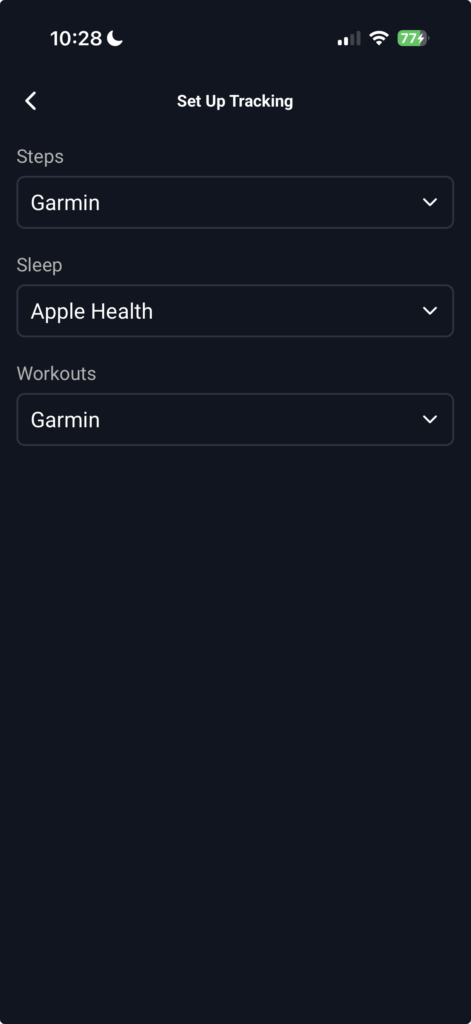
Steps and Sleep data
Morpheus is not receiving the steps and sleep data directly from your wearable tracker device.
It is receiving the data from the database that your tracker syncs its data to.
This is what the Morpheus app is doing every time you open the Morpheus app from it being closed. Morpheus is calling the respective database that you have selected (ie Garmin, Apple Health, Fitbit, Health Connect) and is asking that platform for any new data that has not yet been sent to Morpheus.
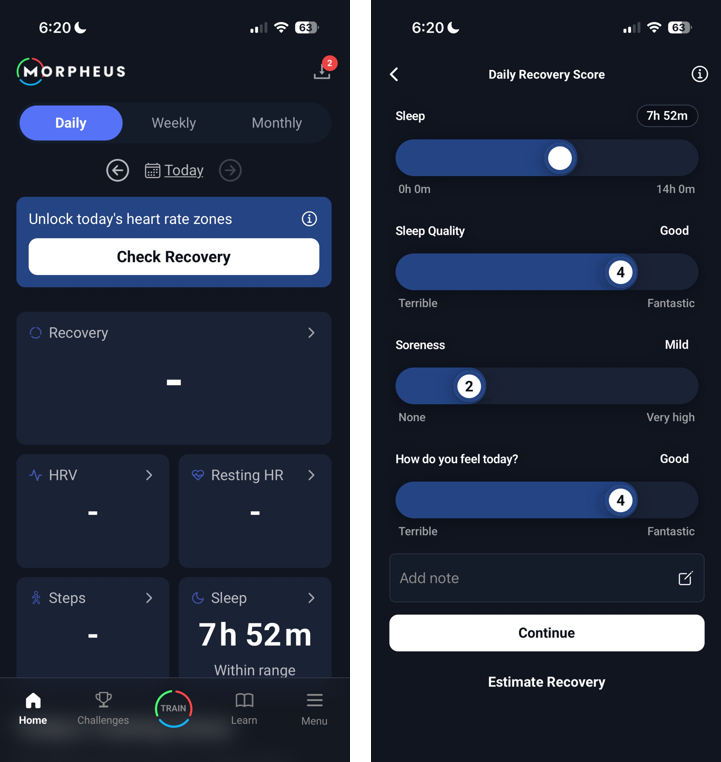
Sleep data can be received by Morpheus once per day before your morning recovery test. This means that before you open the Morpheus app to complete your recovery test, you need to ensure that your sleep hours are visible in whichever platform you have selected.
Your sleep hours will appear on the Morpheus home screen before you tap the white Check Recovery button.
If you do not see your sleep hours, that means that the data has not yet been sent to Morpheus. Double check that your sleep is final in whichever platform you have given permission to send it to Morpheus and then close and reopen the Morpheus app.
You can always choose to manually enter or edit your sleep hours by using the slider bar on the recovery questionnaire. Whatever appears on the slider bar will be your final sleep hours for "today".
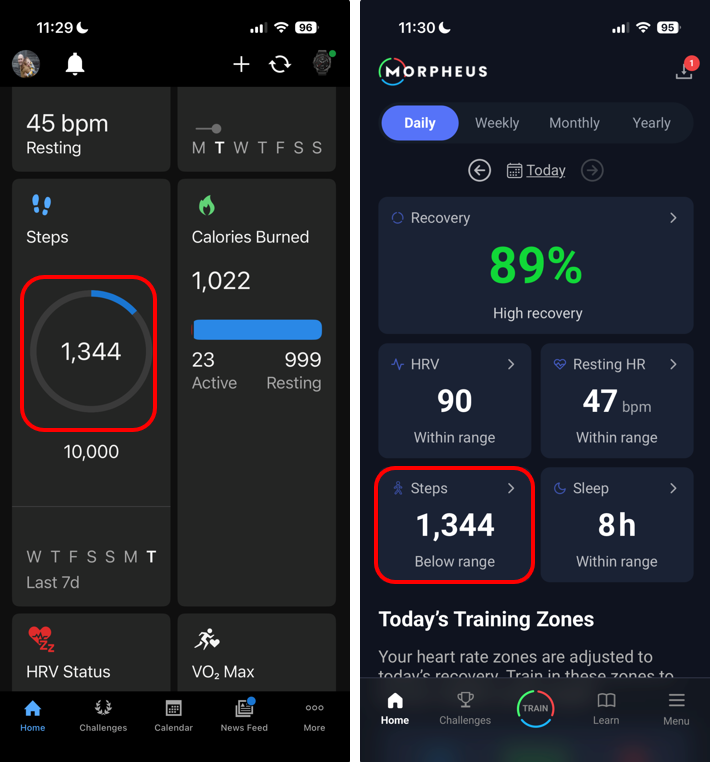
Steps data can be received by Morpheus throughout each day.
That means that as steps get updated into your selected tracking platform from your wearable device, those steps will be sent to Morpheus.
Workouts
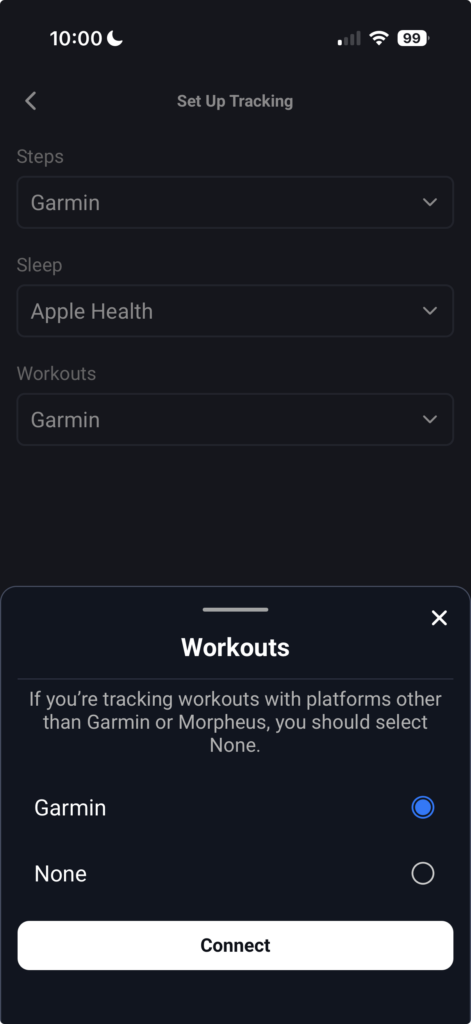
At the present time, Morpheus is able to receive workout data from Garmin Connect. Eventually, we will add more platforms from which we will be able to receive workout data (ie Apple Health).
If you do not use Garmin, you can choose None for the Workouts dropdown and you'll be able to complete workouts live with the Morpheus app or complete with the M7 and then sync to the Morpheus app afterward.
Connecting Garmin and Morpheus
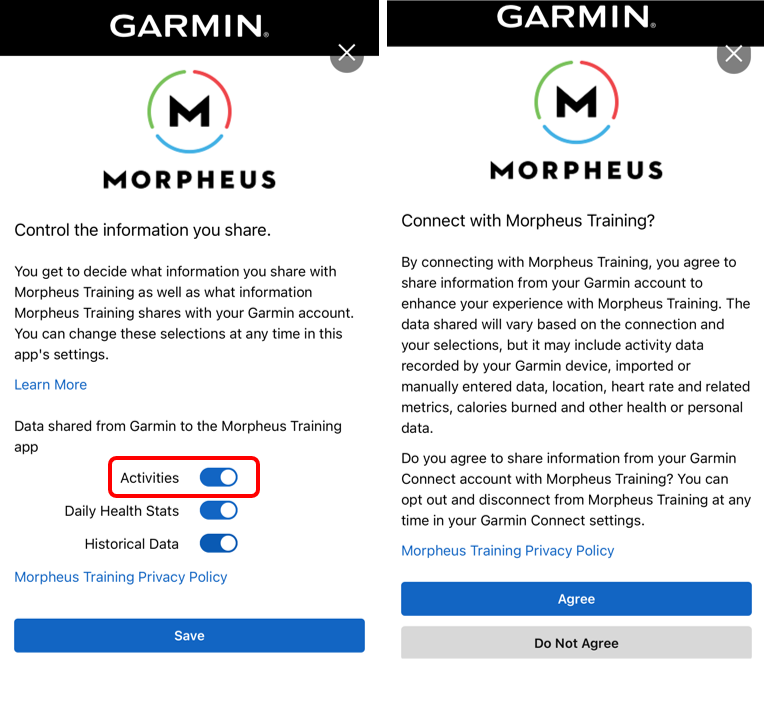
Before Garmin Connect can send workouts to Morpheus, you must first grant the appropriate permissions.
In the Morpheus app, make sure that you have you have Garmin selected within Menu - Set up Tracking - Workouts.
You will need to provide your Garmin Connect credentials when prompted to do so.
Then, you need to have Activities toggled ON. Activities is how Garmin defines workouts in this case.
Tap Save and then tap Agree.
Troubleshooting
Data missing? Sync your device → close Morpheus completely → open Morpheus to force an update.
Sleep shows multiple intervals or totals differ: this is usually how Apple Health aggregates multiple device entries — either manually set sleep in Morpheus or limit sleep writes to one source. Morpheus only displays what it is sent from your 3rd party tracking system. If what you see in Morpheus is incomplete or incorrect, it's because your 3rd party platform has not fully sent the finalized data.
If a connected platform shows “No sleep detected” there’s nothing for Morpheus to receive. Confirm sleep recorded in the platform’s app.
FAQ
Q: Does Morpheus read heart rate or HRV from my wearable?
A: No — currently Morpheus reads sleep, steps, calories and distance from third-party platforms.
Q: My tracker isn’t listed — can Morpheus still get data?
A: Maybe — if your tracker can write to Apple Health (iOS) or Health Connect (Android), Morpheus can usually read that data.
Q: When exactly does Morpheus pull data?
A: Morpheus checks the chosen platform when you open the Morpheus app from being completely closed. If new data exists on the platform, Morpheus will fetch it then. If you’re already in the app, close & reopen to refresh.