
No matter what your specific fitness goals may be, getting the right amount of volume and intensity week in and week out is one of the most important keys to reaching them.
Why?
Because volume and intensity represent the total amount of stress that training imposes on your body. This can also be thought of as the training load – a term that’s often used in coaching circles.
There have been endless debates about different strategies for the right volume and intensity to improve cardiovascular fitness and conditioning.
From high volumes of lower intensity work (zone 2), to low volumes of high-intensity interval training, there are endless options, but how do you know which one is the best for you?
That’s where the Morpheus Weekly Cardio Targets come in.
Built on millions of data points collected from thousands of Morpheus users, the weekly zone targets have been designed to help you find the right amount of volume and intensity each week to reach your fitness goals.
For a deeper dive on this, check out the article here.
How do the weekly zone targets work?
The basic premise of the Morpheus weekly zone targets is simple and yet extremely powerful at the same time.
After your 5th recovery test in Morpheus, you will unlock the weekly cardio targets feature and you’ll see a target range for each of the three heart rate zones.
The reason that your weekly cardio targets are locked prior to your 5th recovery test is because Morpheus is using the data from these tests to form your initial baseline target ranges.
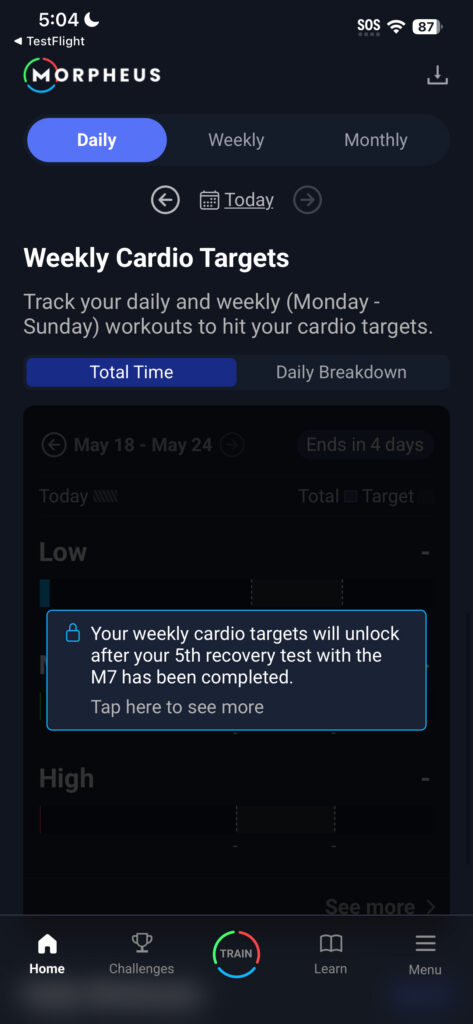
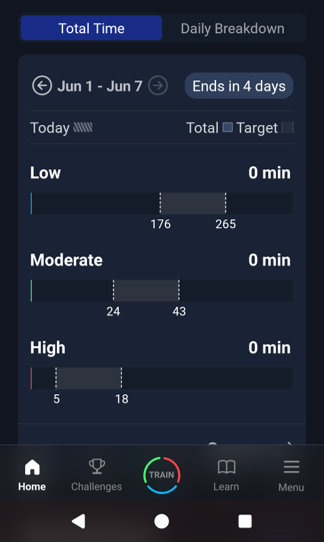
Once your weekly cardio targets are unlocked, you’ll see three black bars (one for each of the three zones) and a gray outlined area with numbers below each side.
These numbers represent the target amount of minutes you should try to hit for each of the three zones each week to see a consistent improvement in your cardiovascular fitness level.
Your weekly cardio targets are always tracked Monday to Sunday.
When you first get started, the target ranges are based on your initial 5 HRV tests, your self-rated fitness level, and what you selected as your fitness goal – to maintain your cardio or to improve your cardio.
But Morpheus has no way of knowing your exact fitness levels or training history, so the ranges start on the low end and progress over time. If your targets are low it’s either because your HRV tests were not done under good testing protocol and/or that your cardio fitness is actually on the lower end and needs to be built up to higher levels which will assist the weekly targets with increasing over time.
Tracking your weekly cardio time
Each time you complete a Cardio or Mixed workout with Morpheus (via Live or Sync), your time in each heart rate zone will update in the weekly cardio targets section in a few different places.
Live app workout view
When you use the Morpheus app in real time to record a Cardio or Mixed workout, there are four different views on the lower half of the screen. You can swipe left or right to get to each of them.
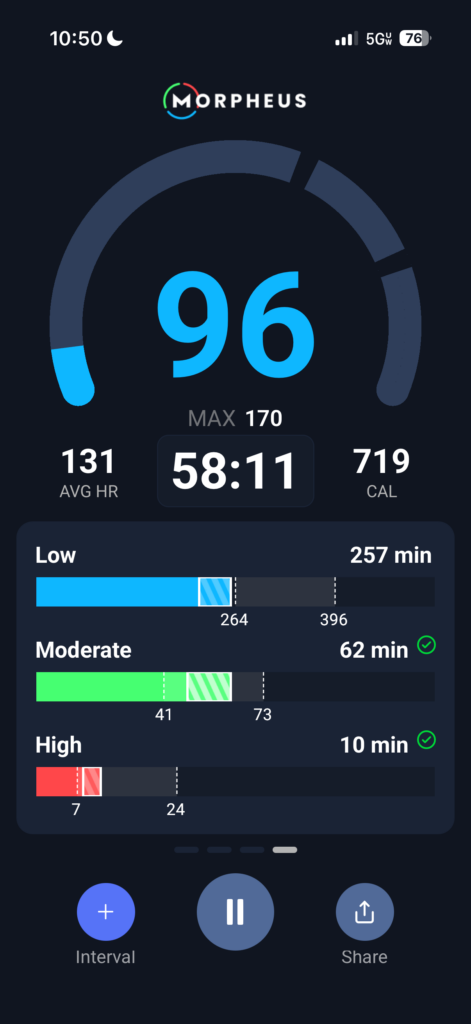
The fourth view is real time tracking of your weekly cardio targets.
As you accumulate time in a zone during the workout, you will see a white outlined area with diagonal lines start to form. This shows you the time completed in that zone during that workout. The white numbers above each bar will update as you accumulate time in each zone.
Workout results view
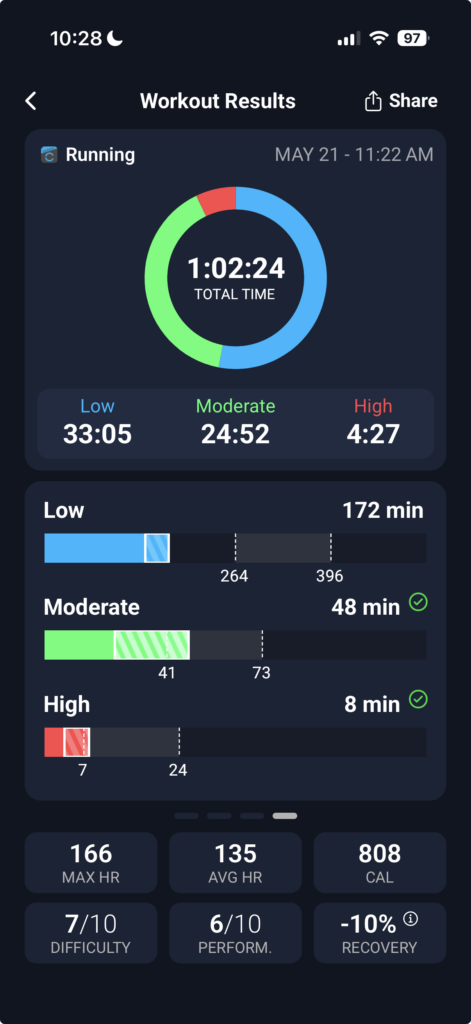
After you fully submit a live or synced workout, you will be redirected to the workout results screen. Here you can see the same four views that you can see during a live app workout, and again the fourth one is your weekly cardio targets.
The time in each zone for this workout will be shown in the white outlined diagonal striped area. This makes it easy to see how each workout contributed to your weekly targets.
Daily home screen view
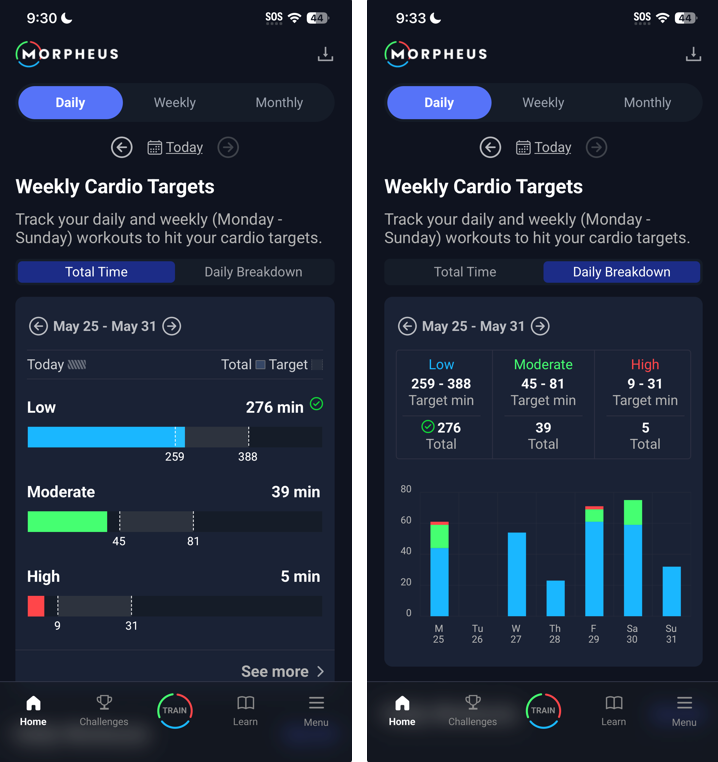
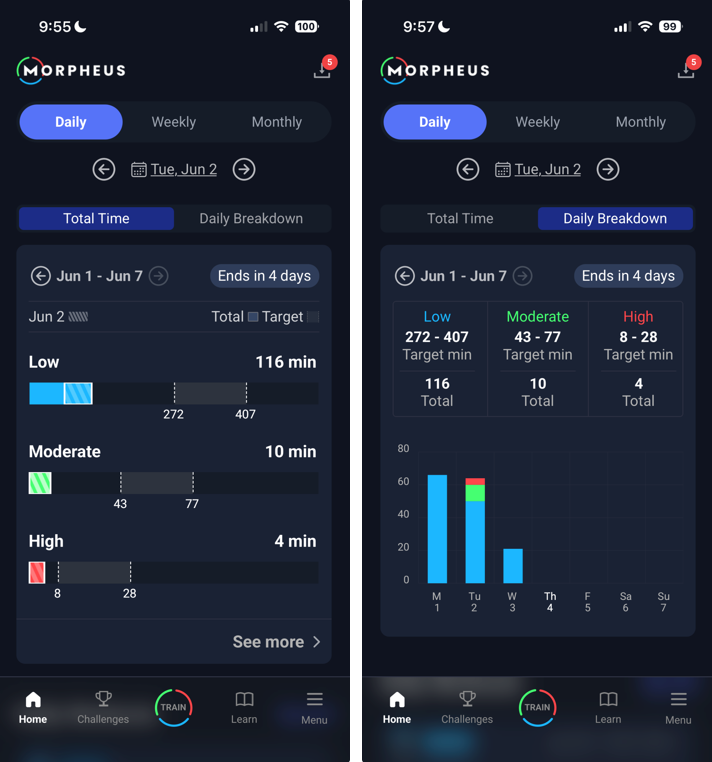
There are two different views on the Daily home screen – Total Time and Daily Breakdown. Both views show you the same data but in different ways.
The Total Time view shows you the black bars filling up with color as you accumulate time in each zone. The total amount of time that you have completed in each zone (during the date range listed in the upper left corner) is shown as a white number on right above each bar.
If you use the date toggle at the top of the home screen (or swipe the screen left or right), you will see your weekly target contributions change based on the date you are viewing.
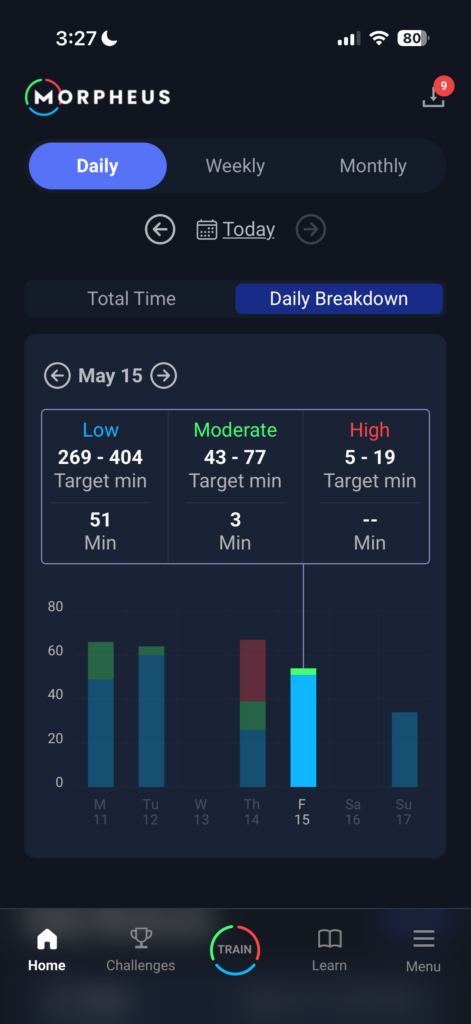
The Daily Breakdown view shows you a bar graph for each day with heart rate zone time recorded within the selected date range.
You can tap on any bar to see specifics for that day.
Updates to your weekly cardio targets
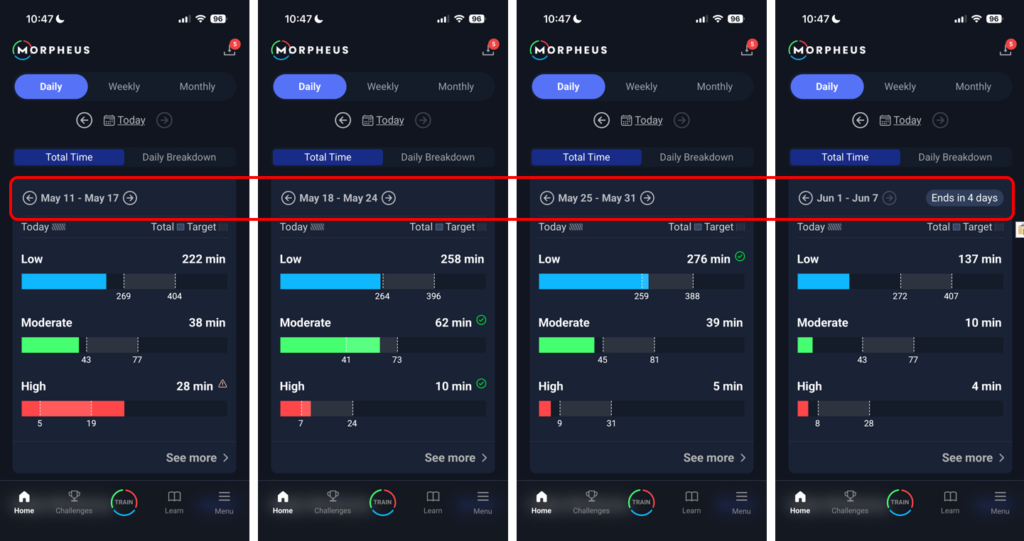
Each Monday morning, Morpheus will evaluate the data from the previous week to assess your fitness level, your recovery, and your training, to set your new zone cardio targets to hit for the week.
To change from week to week, you can tap the date toggle arrows to the left and right of the date range displayed within the weekly targets area.
This will allow you to easily see how your targets are changing from week to week.
It does not matter where in the zone target you get to, whether it’s in the bottom, middle, or top of the range. As long as you’re within the range for the hit, you’ve hit the targets,
If you’re missing the targets, either too low or too high, or your trends are heading the wrong direction, Morpheus may decrease them instead.
Your goal should be to hit all three targets each week. As you continually do this and your fitness improves, Morpheus will adapt to keep you moving forward.
As long as you get into the ranges, or even exceed them, and your recovery is good, those targets will continue to increase weekly (to a certain point, not indefinitely).
In addition to whether you miss, hit, or exceed your weekly cardio targets, Morpheus looks at how your HRV and Resting HR averages are trending from week to week. Morpheus also looks at your recovery score avg from the previous week.
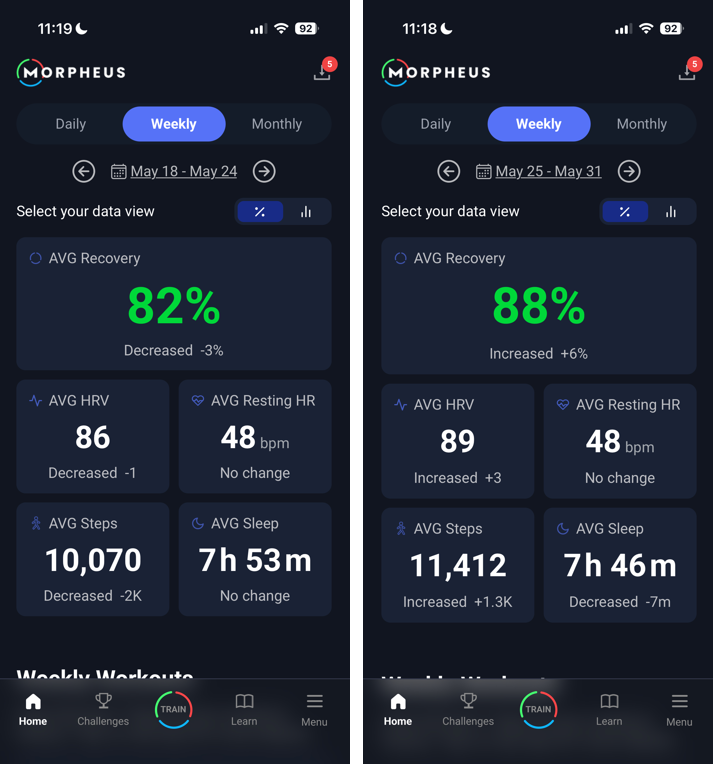
If your HRV and/or Resting HR avg starts trending the wrong direction and/or your previous week recovery score avg is below 80%, then it means you may be doing too much and your targets will go down.
If your HRV and/or Resting HR avg is stable or improving and your previous week recovery score avg is above 80%, then it means your overall training (and life) stress load is likely appropriate, and your weekly targets can increase.
The easiest way to see these things is to tap on the Weekly tab at the top of the home screen and look at your recovery score avg (above or below 80%) and your HRV and Resting HR avg relative to the previous week.
Morpheus is a powerful tool to help you improve your cardiovascular fitness, conditioning, and the better data you put into it, the better results you’re going to get out of it.
This is what makes the zone targets so simple and powerful at the same time.
NOTE: You should only alter programming based on HRV and recovery scores and trends, not on the weekly target ranges by themselves. The targets are just a guide for minimum effective dose of weekly times in zones based on your current fitness level and what we know based on our data is needed for people of various fitness levels to improve or maintain their fitness.
If you start using Morpheus mid-week, the zone targets are not pro-rated for the number of days remaining in the week. This means it may not be possible, or advisable, to hit all the targets during the first week using Morpheus.
The Big Takeaway
Fitness improves when training stress and recovery stay balanced.
Morpheus Weekly Zone Targets help you:
✔ Get enough volume
✔ Use the right intensity mix
✔ Avoid chronic overload
✔ Progress at a rate your body can sustain
Hit your zones, respect recovery trends, and let progress build week after week.