
If something seems off with your M7, don’t worry — most issues have simple causes and easy fixes.
This guide covers charging, connectivity, memory, and common reasons for signal problems.
Charging Your M7
The M7 battery lasts up to 200 hours of use per charge, so you won’t need to charge it often.
Charging Tips
• Charge when battery drops below ~50%
• If battery falls to 10% or less, the LED will blink red when snapped onto the strap (instead of the usual white → blue sequence)
⚠️ Important Charging Rules (Protect Your Device)
To avoid damaging your M7:
✅ Use only the USB-A to USB-C cable that came with the device (or the same type of replacement)
❌ Do not use a USB-C to USB-C cable
✅ Use a standard 5V USB power adapter
❌ Do not use fast-charging phone, tablet, or laptop chargers
High-power adapters can permanently damage the M7.
Checking Your Battery Level in the App
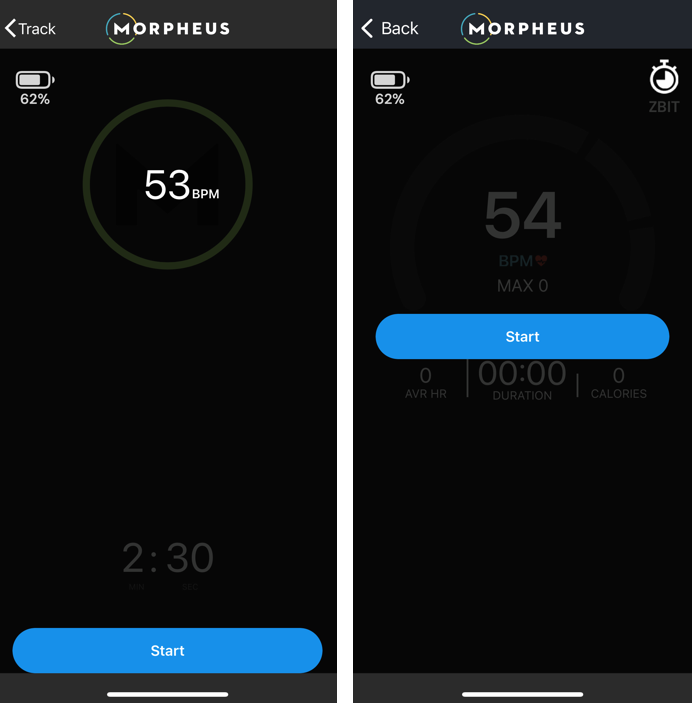
When your M7 is connected during a Recovery Test or workout, the battery percentage appears in the top left corner of the Morpheus app screen.
Connecting the M7 to Other Apps & Devices
The M7 works with:
• Most fitness apps that support Bluetooth
• Watches and devices using ANT+ or Bluetooth (including Garmin)
Using the M7 Internal Memory
The M7 can store about 10 hours of workouts without the Morpheus app open.
How It Works
• Recording starts automatically when the transmitter is snapped onto the strap and detects your heart rate
• Recording stops when you remove the transmitter from the strap
• Workouts must be longer than 10 minutes to be saved
This is useful when training without your phone. You can sync the workout later.
Why You Might Lose Connection During Workouts
Connection dropouts usually happen for one of these reasons:
1️⃣ Poor Strap Contact
If the strap moves, the signal can cut out.
✔ Tighten the strap so it fits snugly
✔ Add water or electrode gel before training
2️⃣ Device Too Far Away
The M7 connects via Bluetooth with a range of about 30 ft (9 m).
✔ Keep your phone or watch close — ideally on your body
✔ Walls, metal equipment, and electronics can weaken signal
3️⃣ Strap May Be Worn Out
Old straps can cause unstable signals even if the transmitter is fine. If issues persist, it may be time for a replacement strap.
Why Heart Rate Readings Look Inaccurate
Here are the most common causes of jumpy or incorrect readings:
Strap Placement
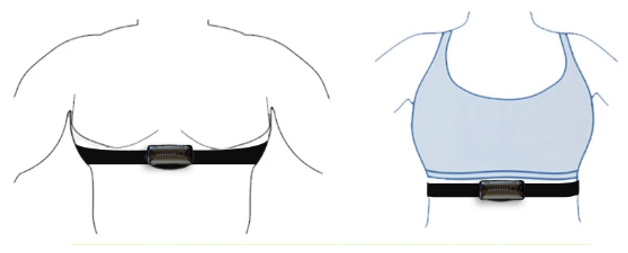
Wear the strap just below your chest muscles, centered over the bottom of your sternum.
• Put the strap on first
• Snap the transmitter on after
Alternative placements:
• Back placement works for some activities (not directly on spine)
• Women often prefer placing it slightly higher under a sports bra
Skin Contact
The strap must stay snug against your skin.
✔ Tighten it so it doesn’t slide
✔ If fully tightened and still loose, a smaller strap may be needed
✔ For high-movement sports, some users secure the strap with waterproof tape
Moisture Matters (Very Important)
Before training:
Put the strap on
Wet the rubber electrode areas (and a little skin underneath)
Snap the transmitter on last
Cold weather, dry skin, and moisture-wicking clothing can delay sweat buildup — making pre-wetting even more important.

Dirty Strap
Sweat, oils, and soap residue block the heart’s electrical signal. Clean the strap regularly, especially the electrodes and snap ports.
Normal Wear & Tear
Straps naturally wear out over time. Even if they look fine, the internal electrodes may degrade.
If cleaning doesn’t fix inaccurate readings, it’s likely time for a replacement strap.
Summary
Most M7 issues come down to one of five things:
• Low battery or incorrect charger
• Strap contact or moisture
• Distance from phone/watch
• Dirty strap or transmitter
• Strap simply worn out
Check these first — they solve the vast majority of problems quickly.